UML Class Diagram
A structural diagram that shows the classes, attributes, operations, and relationships in a system.
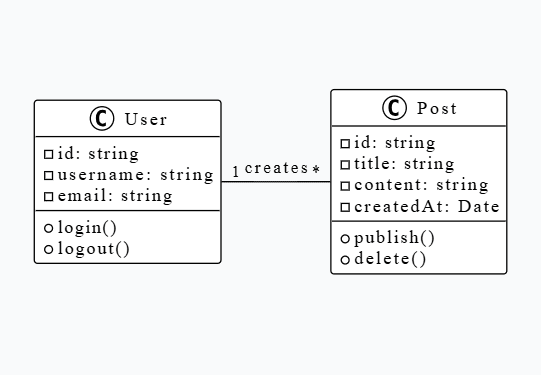
Class diagrams are one of the most fundamental UML diagrams used in object-oriented design. They provide a static view of a system by showing classes, their attributes (properties), methods (operations), and the relationships between classes. Class diagrams are essential for understanding the structure of a software system and are widely used in software engineering, system design, and documentation.
Class
A blueprint for creating objects. Represented as a rectangle with three compartments: class name, attributes, and methods.
Attributes
Properties or data members of a class. Can be public (+), private (-), or protected (#).
Methods/Operations
Functions or behaviors of a class. Represent what the class can do.
Relationships
Connections between classes including Association, Inheritance, Aggregation, Composition, and Dependency.
Multiplicity
Indicates how many instances of one class relate to instances of another class (e.g., 1, *, 0..1, 1..*).
- •Software Requirements Analysis - Understanding system structure before implementation
- •System Design Phase - Planning the architecture and class structure
- •Code Documentation - Visual representation of code structure for developers
- •Database Design - Mapping object models to database schemas
- •API Design - Documenting request/response structures and data models
- •Educational Purposes - Teaching object-oriented programming concepts
- •System Maintenance - Understanding existing codebases and refactoring
- •Team Communication - Sharing design ideas and system architecture
Use Cases:
Industries:
Open UML Diagram Studio
Navigate to the Studio page and open the code editor. You can start with a blank canvas or use a template.
Start with @startuml
Begin your PlantUML code with @startuml and set the theme. Add a title for your diagram.
@startuml
!theme plain
skinparam backgroundColor transparent

title Class Diagram ExampleDefine Classes
Create classes using the 'class' keyword. Add attributes and methods inside curly braces.
class User {
  -id: string
  -username: string
  -email: string
  +login()
  +logout()
  +getProfile()
}Add Relationships
Define relationships between classes using arrows and relationship types (--, <|--, *--, etc.).
class User {
  -id: string
  -username: string
}

class Post {
  -id: string
  -title: string
  -content: string
}

User "1" -- "*" Post : creates
User <|-- Admin : extendsAdd Multiplicity and Labels
Specify how many instances relate to each other and add descriptive labels to relationships.
User "1" -- "*" Post : creates
User "*" -- "1" Category : belongs toPreview and Refine
Use the real-time preview to see your diagram. Refine the layout, add more classes, or adjust relationships as needed.
Export Your Diagram
Once satisfied, export your diagram as PNG or SVG for use in documentation, presentations, or reports.
@startuml
!theme plain
skinparam backgroundColor transparent

title E-Commerce System Class Diagram

class User {
  -id: string
  -username: string
  -email: string
  -password: string
  +login()
  +logout()
  +register()
  +updateProfile()
}

class Product {
  -id: string
  -name: string
  -price: number
  -description: string
  -stock: number
  +getDetails()
  +updateStock()
}

class Order {
  -id: string
  -orderDate: date
  -totalAmount: number
  -status: string
  +calculateTotal()
  +updateStatus()
}

class OrderItem {
  -quantity: number
  -price: number
  +calculateSubtotal()
}

class Category {
  -id: string
  -name: string
  -description: string
}

' Relationships
User "1" -- "*" Order : places
Order "1" -- "*" OrderItem : contains
OrderItem "*" -- "1" Product : references
Product "*" -- "1" Category : belongs to

@enduml- ✓Keep classes focused on a single responsibility (Single Responsibility Principle)
- ✓Use meaningful names for classes, attributes, and methods
- ✓Show only essential attributes and methods to avoid clutter
- ✓Use appropriate relationship types (inheritance, composition, aggregation)
- ✓Include multiplicity indicators for clarity
- ✓Group related classes together visually
- ✓Use packages or namespaces for large systems
- ✓Document complex relationships with notes
- ✓Keep the diagram at an appropriate level of abstraction
- ✓Update the diagram as the system evolves